Internet Protocol Television (IPTV): The Ultimate Guide to Modern Streaming
Introduction: The Digital Revolution of Home Television has moved a long way from the clunky boxes and fuzzy aerials of years gone by. These days, the world is embracing a more adaptable, data-led experience called Internet Protocol Television. This technology lets you stream your favourite programmes over the very same fast connection that runs your laptop. In this guide, we look at how this digital innovation works, which hardware you will need and how to fine-tune your setup for buffer-free viewing in 2026. Get ready to turn your living room into a worldwide entertainment hub.
1: Foundations and Technical Mechanics
Internet Protocol Television (IPTV): The Ultimate Guide to Modern Streaming Internet Protocol Television is genuinely reshaping the way we enjoy media every day. Rather than depending on traditional cables, it runs over your home network. As a result, you have far more say over what you watch and when you watch it. In truth, it feels like carrying an enormous library around in your pocket.
What is Internet Protocol Television? Put simply, this service delivers TV content across Internet Protocol (IP) networks. Satellite broadcasts work differently, whereas this method sends information in compact packets. That is why your stream stays far more efficient. Most viewers find it much handier than fixed TV schedules. Above all, it offers a personal touch that cable just cannot compete with.
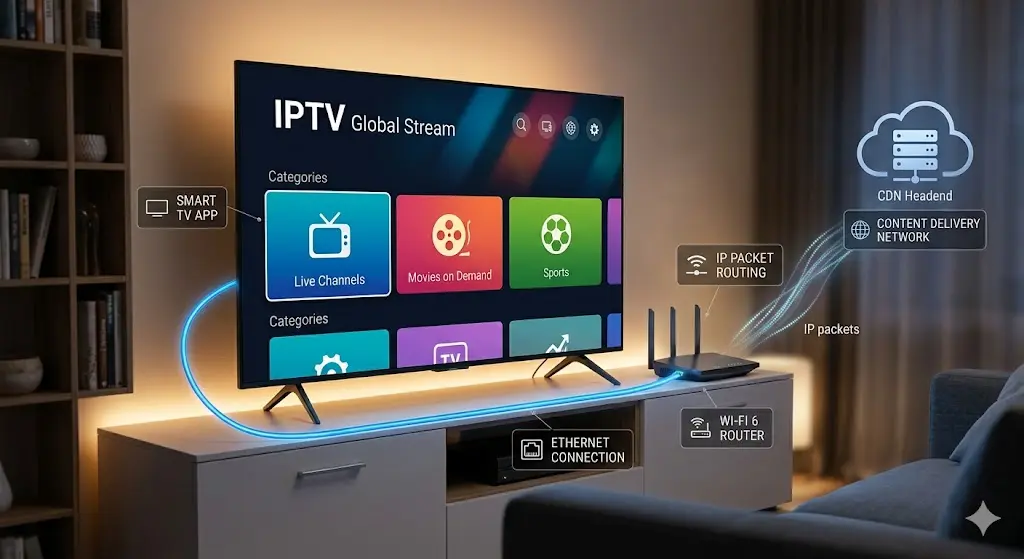
How Internet Protocol Television Works: The Technical Backbone Learning what happens behind your screen is surprisingly interesting. First of all, your provider places its content onto a central server. From there, the data moves across a content delivery network (CDN).
The Architecture of IPTV Networks The magic begins at the “Headend”. This is where national channel feeds are turned into digital data. Those bits then race across the core network until they reach your router. On top of this, middleware holds the user interface together.
Unicast vs. Multicast Delivery Whenever you watch something on your own, you are using a unicast stream. Live sport, on the other hand, frequently relies on multicast technology to conserve bandwidth. In other words, the server sends a single stream to lots of viewers at the same moment. This stops the network from collapsing during massive championship matches.
Video Compression and Codecs Providers rely on clever video compression methods to keep pictures sharp. The H.265 codec, for example, reduces file sizes while keeping every detail. This means you can watch high-definition streaming even on a modest connection. It also keeps 4K playback fluid and vibrant.
Types of IPTV Services You are not limited to a single way of using this digital service. In reality, most people use a mix of formats every day.
Video on Demand (VOD) Video on Demand is probably the most loved feature on offer right now. You can scroll through thousands of titles and press play at any moment. It behaves just like the film apps you already use. What’s more, you will never need to stress about missing a premiere.
Time-Shifted Media Ever walked through the door too late for your favourite programme? With time-shifted media you can “catch up” straight away. You are able to rewind live shows or start them again from the top. For busy workers, it is a real lifesaver.
Live IPTV Naturally, live television is still the core of the whole experience. You can follow news, award ceremonies and sport as they happen. Thanks to packet switching, the delay is now close to nothing. In the end, viewers get the best of both worlds.
2: Hardware and Setup Ecosystem
Essential Hardware for Internet Protocol Television Picking the correct equipment is absolutely essential for smooth, uninterrupted viewing. Some viewers are happy with the basics, while others choose premium gadgets for top performance. The hardware you choose really is the brain of your whole streaming setup.
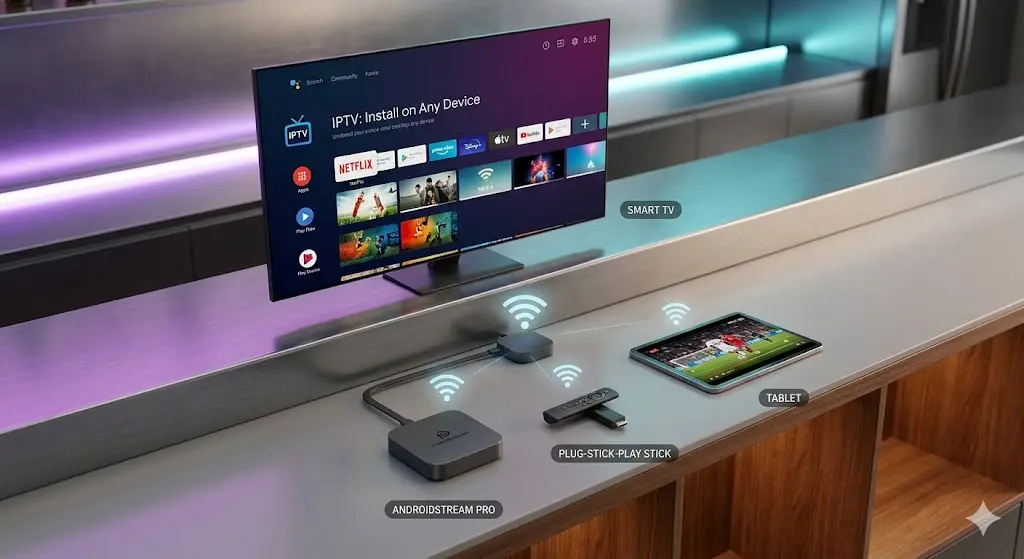
Smart TVs Many modern TVs already support a range of digital apps out of the box. You may not need any external device to begin. Manufacturers such as Samsung and LG use their own operating systems to run streaming media without fuss. Bear in mind, though, that built-in processors can slow down as the years go by.
The Role of the Android TV Box If you want extra power and flexibility, a separate external unit is an excellent option. To make the most of your setup, a high-performance android tv box uk guide is vital for smooth 4K playback. These boxes usually run cooler and navigate faster than standard TV software. They also make it simple to sideload a variety of set-top box tools.
Plug-and-Play Devices Gadgets such as the Firestick or Roku are hugely popular thanks to their small size. Just plug one into an HDMI port and join your Wi-Fi. That makes them ideal for travellers who want their live television wherever they go. Despite their size, these “sticks” have plenty of power for high-definition streaming in most homes.
Step-by-Step Setup Guides Getting your service set up can look a little intimidating to begin with. Follow a sensible order, however, and your favourite channels will be playing before you know it.
Configuring Smart IPTV on Your Television To start, download a compatible player from your TV’s app store. For viewers in Britain, a detailed smart iptv uk setup guide 2026 explains the particular app requirements for local ISPs. With the app in place, you normally only need to add your M3U playlist link. Above all, check that your broadband connection is active before you begin syncing.
Installing IPTV on Different Smart TV Brands Every manufacturer handles third-party software in its own way. Whether your TV is a Samsung, LG or Sony, follow a dedicated install iptv smart tv uk guide to make sure the middleware is compatible. Certain brands ask you to switch on “Unknown Sources” in the settings menu. Once that is done, installation is simple and easy to follow. Honestly, it is far less hassle than fitting an old satellite dish!
3: Performance, Optimization, and Reliability
Why Streaming Quality Matters in 2026 In today’s digital world, viewers expect nothing short of perfection from their entertainment. As premium screens fall in price, the move towards 4K and 8K broadcasting is speeding up quickly. Your network therefore needs to be strong enough to cope with heavy data loads without a single glitch. Let’s be honest, no one will put up with blurry pictures or out-of-sync sound nowadays.
Ensuring a Reliable Connection A stable stream is quite literally the heartbeat of any quality home entertainment system. If your bandwidth jumps around, your viewing will certainly suffer. Lots of users experience lag at busy times, so it is crucial to choose a provider offering iptv pro uk reliable streaming 2026 to prevent breaks during live events. As a guide, at least 25 Mbps is advised for one UHD stream. Homes with several devices in use should target a broadband connection of 100 Mbps or more.
Troubleshooting and Improving Your IPTV Experience Even excellent setups sometimes hit small technical hiccups or slowdowns. Most problems, though, are simple to sort out once you know which settings to adjust.
Dealing with Buffering and Latency Buffering usually comes down to packet loss or limited data flow from your ISP. To fight back, change your DNS settings to Google (8.8.8.8) or Cloudflare (1.1.1.1). A fast VPN can also get around bandwidth throttling during big sporting fixtures. Because your traffic is encrypted, your provider cannot tell that you are streaming live television.
Hardware Optimization Your physical kit has a huge effect on how data is handled and shown on screen. For professional hardware and premium subscriptions across Europe, you could visit bentvspro.uk for regional hardware recommendations. Clearing your app cache regularly also stops the middleware from slowing down. Make sure your set-top box firmware is always on the newest version for improved stability.
Network Best Practices Wi-Fi is handy, but other gadgets around the house can easily interfere with it. For rock-solid stability, nothing beats a wired Ethernet connection for Internet Protocol Television. If wireless is your only choice, move to the 5 GHz band for quicker speeds. In the end, a bit of tidy cabling goes a long way towards a perfect film night.
4: Legalities, Market Trends, and FAQs
The Legal Landscape of Internet Protocol Television Working out the legal side of digital streaming can feel like finding your way through a tricky maze. In short, the technology is completely legal, yet distributing content needs the correct licences. Big names such as YouTube TV or Hulu are confirmed examples of legitimate Internet Protocol Television. By contrast, some third-party sellers promise thousands of premium channels at a suspiciously cheap price. Relying on these unverified services can result in sudden shutdowns or even warning letters from your ISP. Always check that a provider owns the broadcasting rights required for your region.
The Future of IPTV: AI and Personalization Looking to the future, the streaming world is adopting artificial intelligence to transform how we find new things to watch. By 2026, lots of platforms will rely on AI to guess precisely what you fancy watching based on your mood. This degree of personalization makes the whole experience remarkably intuitive and seamless. For regional services in Poland, Polskiiptv.pl provides local guidance on compliant streaming options. We also expect to see more interactive storytelling that let viewers pick different storylines as they watch. In Greece, platforms such as Iptvgreeks.org lead the way in delivering cultural content over IP protocols. Clearly, the boundary between traditional TV and gaming is fading fast.
Frequently Asked Questions
Is Internet Protocol Television legal in the UK? Yes, it is legal provided the provider holds a licence for the content it shows. Approved broadcasters such as Sky or BT are fully compliant. Steer clear, however, of services promising “free” premium sport, as these are normally illegal.
What internet speed do I need for IPTV in 2026? Standard definition usually works well on 5 Mbps. For 4K playback, you will need a minimum of 25 Mbps for each device. Homes with several viewers should ideally have a 100 Mbps line to avoid any buffering at peak times.
Can I watch IPTV without a special box? Definitely! Apps are available for smartphones, tablets and laptops. Most up-to-date Smart TVs also let you download player apps straight from their store. In truth, flexibility is the biggest advantage of this technology.
Why does my stream keep freezing? Freezing tends to be the result of ISP throttling or poor Wi-Fi. Test a wired Ethernet cable or a VPN to see whether stability gets better. If nothing changes, your provider’s server may simply be overloaded.